It is unreadable on the phone people are actually holding
Most searches for a place to eat tonight happen on a phone, standing outside, deciding fast. A site that makes someone pinch and zoom loses that decision to the next result.
Built for the room, not the brochure
We build and run a custom-coded website for independent restaurants, bars and cafes across the US: menu, reservations, private dining and weekly articles, plus AI that answers guests on the plans that include it. Live in 7 days, 90+ PageSpeed guaranteed, hosting and updates included, from $117 a month.

Built for the rooms people already want to be seen in
We expected a prettier website; what we actually use every day is the new form. It collects occasion, guest count and preferred evening up front, so the back-and-forth we used to do by reply has largely gone. It has quietly removed the slowest step in our intake.
I tested the bistro private dining page on my own phone before we approved anything. The important details sit near the top and the inquiry button is impossible to miss. Sending the link by text during a call finally works the way it should.
They asked to see the questions customers genuinely ask us about bistro private dining, which I respected. The recurring questions were pulled out, rewritten clearly, and approved line by line by our team. Pointing people to the page has replaced hunting through old emails.
Most searches for a place to eat tonight happen on a phone, standing outside, deciding fast. A site that makes someone pinch and zoom loses that decision to the next result.
A neighborhood restaurant sells atmosphere as much as food. Blurry phone photos or a stock image gallery undersell a room people would genuinely want to be seen in.
If the fastest way to reserve is calling during service, most people give up and pick somewhere with a button. The path from homepage to seated table needs to be that short.
Different hours, an old menu, a phone number that rings a disconnected line. Every mismatch between the map listing and the site costs a cover before anyone reaches the door.
Doing nothing is not free. A dated site keeps costing covers in ways that never show up on one invoice, so they are easy to ignore until you add them up.
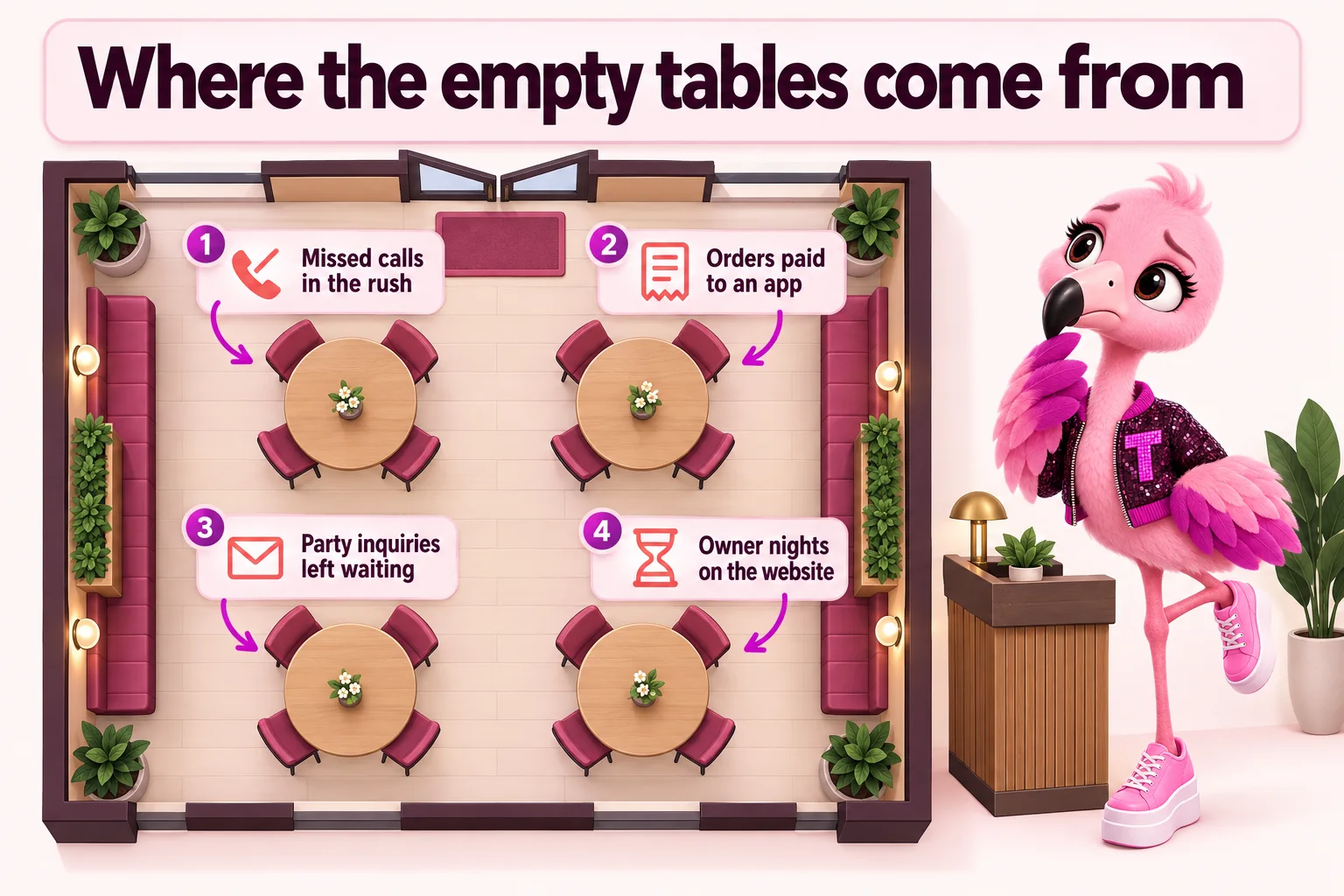
Every ring the host stand misses at 7:30 on a Friday is a party calling the next place on the map. It happens every weekend, and nobody counts it.
When search sends hungry people to a delivery app instead of your own ordering page, you pay a platform to sell your food to guests who were looking for you.
A vague inquiry that needs three emails before you can price it often books with the room that answered first.
Every evening spent wrestling a page builder or chasing a freelancer is an evening not spent on the floor, the menu or the team.
Paid clicks that land on a page that will not load on a phone are paid for in full and bring nobody to the table.
Old hours or last season’s menu online make people assume you are not open, not serving brunch, or not worth the walk.
Every figure above is a plan term, not a guess. See the exact numbers on pricing.
Five stages, not a straight line. Here is where the website's job starts and where it hands off to the room itself.
A search for the neighborhood or the cuisine lands on a homepage that already looks like the room, not a placeholder.
The "book a table" path is one tap from the hero, not buried under a phone number nobody answers during service.
Your reservation or waitlist tool takes it from there. The site hands off cleanly instead of duplicating a booking flow.
Hours, parking notes and the map pin match what is on your Google Business Profile, so nobody circles the block twice.
A room worth photographing, on a site that photographed it well first. That loop is what keeps a neighborhood spot full.
Custom-coded pages served from the edge, 90+ PageSpeed guaranteed.
Update prices, specials and dishes yourself, or hand it to us, without touching code.
Your booking and waitlist tools live on the page, not buried behind a link.
A photo-forward layout that makes the space and the plates the main event.
Your hours, photos and location stay accurate everywhere someone searches for a table.
A dedicated page for buyouts, parties and private dining, with a real inquiry form.
Every feature below, the everyday problem it solves, what you have to do, and which plan carries it. The Table is $117/ month, The Full House $247/ month + usage, Standing Room Only $597/ month.
Custom-coded pages served from the edge, 90+ PageSpeed guaranteed.
Update prices, specials and dishes yourself, or hand it to us, without touching code.
A photo-forward layout that makes the space and the plates the main event.
One site, every location, each with its own hours, menu and map pin.
Your booking and waitlist tools live on the page, not buried behind a link.
A dedicated page for buyouts, parties and private dining, with a real inquiry form.
One page that sends people to your ordering platforms instead of a search results page.
Every form, chat and event inquiry lands where your team already works, with the right person notified.
Your hours, photos and location stay accurate everywhere someone searches for a table.
A third researched article every week, plus 3 social posts and 2 reels a week.
2 to 3 researched articles a week, 2,500 to 3,200 words each, on every plan.
Technical and on-page SEO, structured data, FAQ answers and llms.txt so search engines and AI assistants can understand you.
Answers common questions and routes inquiries to the right inbox, day and night.
Answers the phone when the team cannot, with your real hours, menu and policies, and books or takes details.
A chat window on every page that answers guests at any hour and passes real inquiries to you.
Guests text a question and get an answer from your real details; we file the carrier registration texting needs.
Cloudflare hosting with SSL, CDN, DDoS protection and unmetered bandwidth, all inside the monthly fee.
Domain registered in your name, redirects from your old pages, and a content export if you ever leave.
5 revisions a month of any size, each done within 2 to 5 working days, requested from your client portal.
Short answer: a fast, relevant page helps you keep the visitors you already pay for and can lower what each ad click costs. We build every site to load fast from day one and keep it that way after every change.
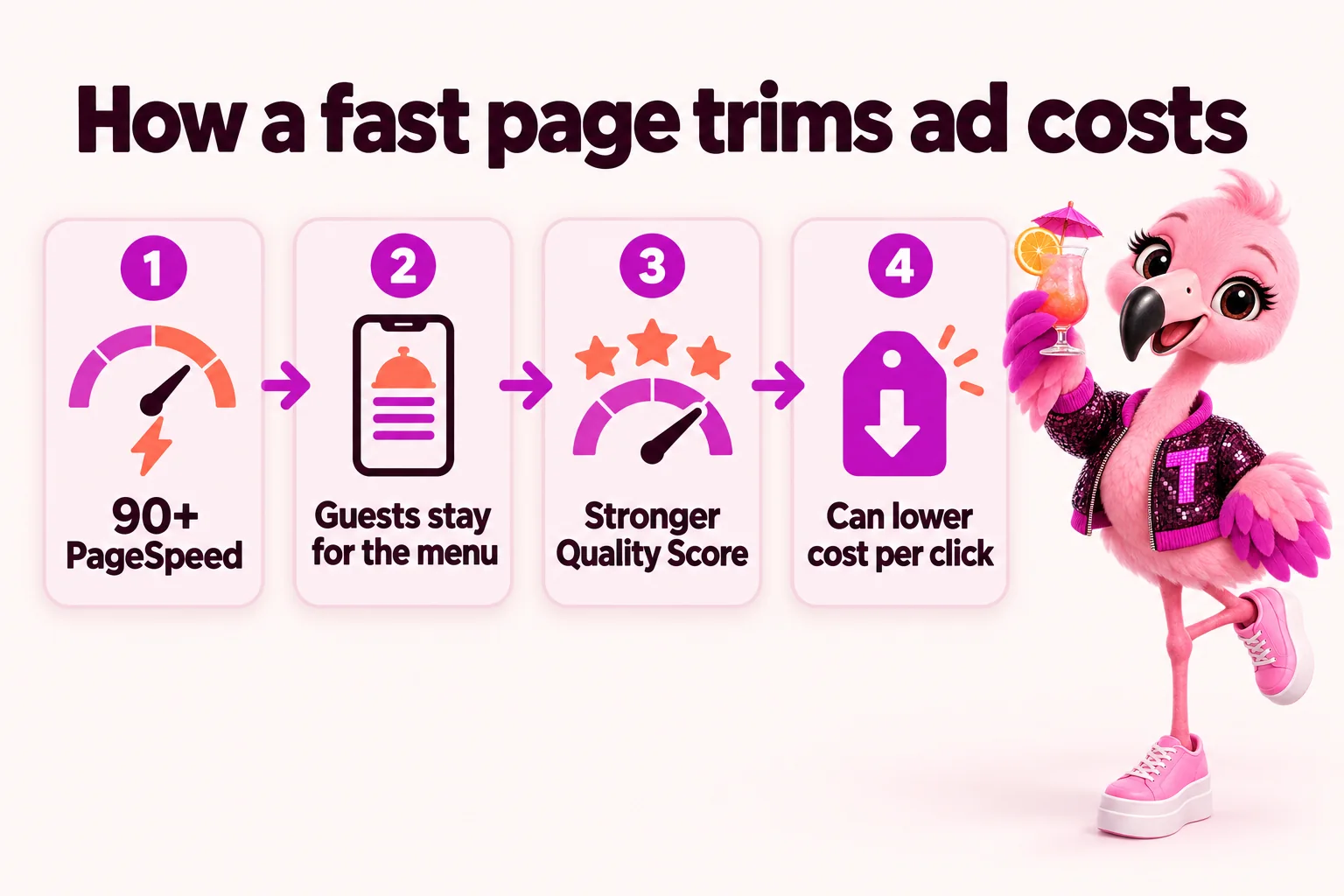
Every page is custom coded, ships very little JavaScript and is served from a global edge network, with 90+ Google PageSpeed guaranteed on mobile and desktop. Menus, hours and the booking button load before a guest standing on the sidewalk gives up.
Google Ads rates every keyword with a Quality Score, and landing page experience is one of its three parts. A page that loads fast and matches what the ad promised helps that score, and a stronger Quality Score can lower what you pay for each click and improve where the ad shows.
Every guest who taps an ad and leaves before the page appears is money spent on nobody. A page that opens quickly helps reduce those lost visits, so more of the paid clicks you already buy reach the menu or the booking step.
We do not promise a specific cost per click, percentage or ranking; ad prices depend on your bids, competitors and keywords. Source: Google Ads Help, "About Quality Score for Search campaigns", accessed September 18, 2026.
Every plan is built to be found by the people deciding where to eat, whether they type into Google, ask a voice assistant or ask an AI chat. Here is what that means in practice.
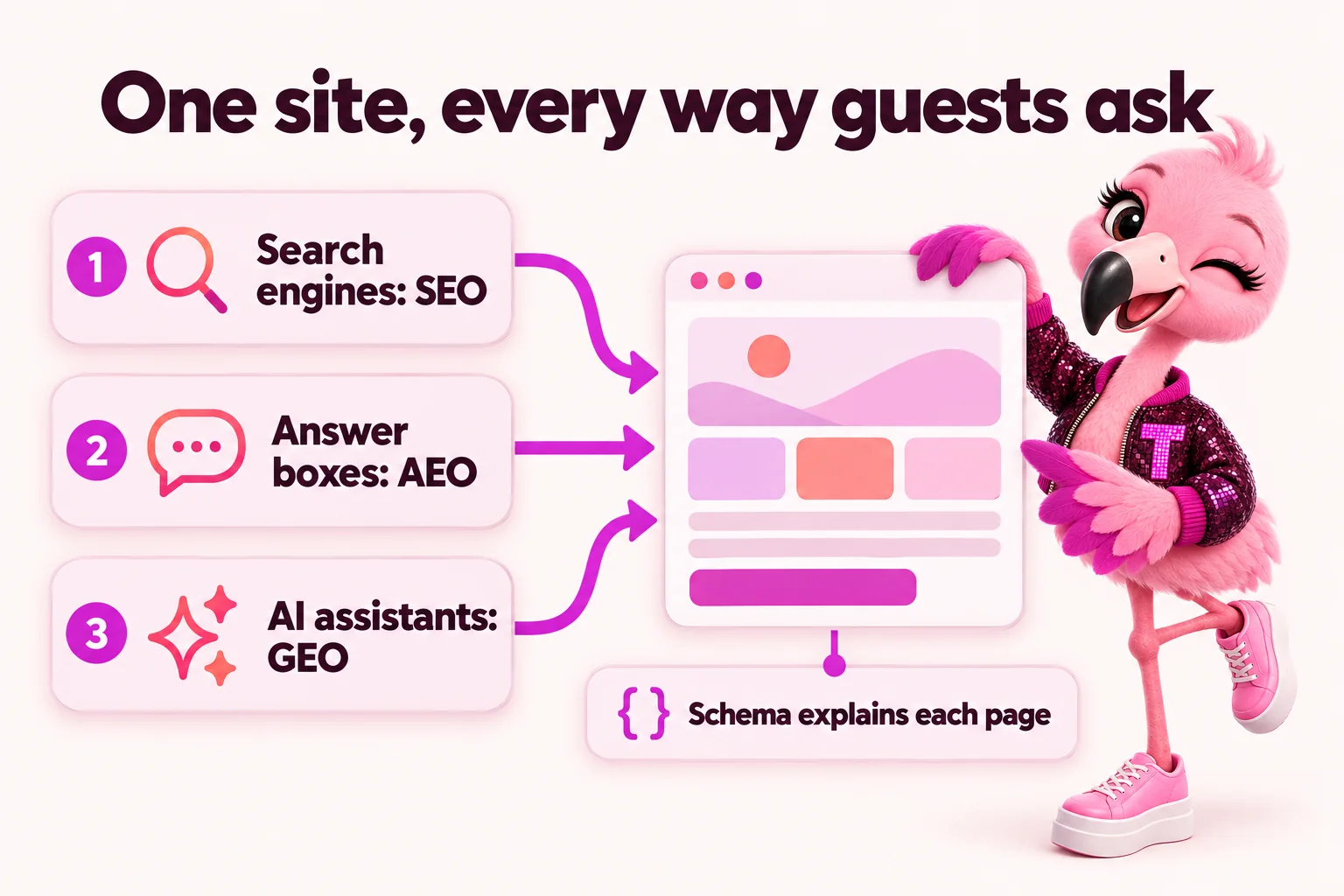
Technical SEO (fast pages, clean URLs, sitemaps, canonical tags, mobile-first layouts) and on-page SEO (real menu text instead of a PDF, one clear topic per page, descriptive headings). Each of your locations gets its own page with its own hours, address and map pin, and articles cover your neighborhood and cuisine, which is how local searches such as "brunch near me" or "cocktail bar downtown" find you.
Pages open with the direct answer, then explain. FAQ blocks answer what guests actually ask: do you take walk-ins, is there parking, can you seat twelve. That structure is what search engines lift into featured snippets and voice answers.
Clean, consistent facts about your restaurant, an llms.txt file and citable, dated content make it easier for AI assistants such as ChatGPT, Claude, Perplexity and Google AI Overviews to understand and mention you. Nobody can guarantee a place in an AI answer; this is the groundwork that makes it more likely.
We add structured data that describes your business, services, FAQs and breadcrumbs, plus reviews once you have real ones. It tells search engines exactly what each page is, which is what rich results and knowledge panels are built from.
On every plan. Search results take time: we guarantee your site starts ranking for local searches in your area within 3 to 5 months of launch, or we keep doing the search work at no extra charge until it does. How restaurant SEO works here
Same room, same menu. The difference is what a visitor sees before they ever walk in.
Custom-coded pages served from the edge, 90+ PageSpeed guaranteed.
A page that opens instantly keeps the person who was one thumb-swipe from leaving. Every page here is custom coded rather than built from a stack of plugins, ships almost no JavaScript, and is served from a global edge network, so it loads fast on the day it goes live rather than after someone finally audits it. That matters most for a restaurant site, because most of the traffic that decides tonight's plans is standing at a bar, on a train platform, or half paying attention while a friend argues about where to eat. 90+ PageSpeed is not a target we chase after launch. It is the baseline every page ships with.
Most restaurant searches happen on a phone, usually within a few minutes of wanting a table tonight, so the site is designed mobile-first rather than shrunk down from a desktop layout as an afterthought. Menus, hours, the reservation link and the address are one thumb-reach away on every page, not buried three taps deep in a hamburger menu. Photos load sized for the screen they land on instead of dragging down a full desktop image on data. The result is a site that feels quick and obvious to someone standing outside deciding whether to walk in, which is exactly the moment it needs to work.
Your booking and waitlist tools live on the page, not buried behind a link.
Your reservation and waitlist tools sit directly on the page instead of behind a link that opens a slow third-party site in a new tab. Whatever platform you already use for bookings, we build it into the design so the flow from browsing your gallery to picking a time feels like one continuous action, not a handoff to somewhere that looks nothing like your site. For a walk-up crowd on a Friday night, a waitlist widget on the homepage means someone can add their name from the sidewalk instead of calling and hoping someone at the host stand picks up.
Once the integration is built, it keeps working without you touching it again. If you switch reservation platforms later, that is one revision request, not a rebuild. We handle the setup, the placement, and making sure the booking button is the most obvious thing on the page above the fold, because a reservation panel someone has to hunt for is a reservation that goes to whichever competitor made theirs easier to find first. That reliability matters most on a night when the room is slammed and nobody on the floor has time to troubleshoot a broken embed halfway through service.
A photo-forward layout that makes the space and the plates the main event.
A restaurant sells an experience before it sells a dish, so the gallery is built to carry real photography of the room, the bar, the plates and the crowd, not a handful of stock interior shots that could belong to any restaurant in the country. The layout is photo-forward by design: large images, minimal text competing for attention, and a grid that holds up whether you have twelve strong photos or two hundred. This is usually the page that convinces someone your dining room is where their group photo should be taken this weekend.
A gallery that has not changed since opening week stops working the moment regulars notice. Adding new photos from a recent event, a new dish or a renovated patio is a normal revision request, so the page can move at the same pace as your social feed instead of lagging a year behind it. We can also pull in a live feed from your existing social accounts if you would rather the gallery update itself between requests, so the newest photo from last night's dinner service shows up here too.
No mystery between paying and opening the doors. Here is every step, who does it, and how long it takes.
The monthly fee starts the plan. The $647 build fee is not charged now.
Your part: Choose a plan.
Menu, hours, locations, photos, brand and where inquiries should land. About 15 minutes; send what you have and the rest later.
Your part: About 15 minutes.
We fill any gaps, agree the pages and lock the launch date. The build clock starts here.
Your part: One call.
Live in 7 days on The Table, 10 on The Full House while the AI Engine learns your details, 15 on Standing Room Only. Real menu, real photos, reservations wired in.
Your part: Nothing, unless we ask.
You see the finished site first. The $647 build fee is invoiced only after it is live and you are happy with it.
Your part: Approve.
5 revisions a month, each within 2 to 5 working days, weekly articles, your map listing kept in step, speed checked after every change.
Your part: Send changes from your client portal.
Six ways social dining shows up, each with its own pages, tool and pitfalls.
Real projects, told from the starting point to what changed, in the words of the people who run the floor.
See a build for your kind of restaurant on a 30-minute call. Plans from $117 a month, live in 7 days, and the $647 build fee is invoiced only after you approve the launch.
Nothing to pay on the call, and nothing for the build until you approve the launch.
EateryWebStudio works remotely with restaurants anywhere in the United States. Onboarding is one call and everything else runs through your client portal, so it makes no difference whether your room is around the corner or three time zones away. These are some of the states our kind of room is busiest in.
Not in these states? Same plans, same timelines, same prices everywhere in the US. Your own site gets a page for each of your locations, with its own hours, address and map pin.
Answer first: divide the monthly plan price by what a table spends with you. That is the number of extra tables a month the site needs to bring in to pay for itself. Type your own average table spend to see it for each plan.
Plan price a month ÷ average spend per table = tables a month to break even
A worked example with your number, not a promise of results. It leaves out the build fee, which is paid once, and AI usage on The Full House, which is billed at cost.
Every plan includes the site, the hosting and the updates. The $647 build fee is one-time and only invoiced after your site is live.
The Table
The website, fully managed
plus $647 one-time build fee, invoiced after launch
The Full House
Everything, plus the AI Engine
plus $647 one-time build fee, invoiced after launch
Standing Room Only
Everything, plus the Content Engine
plus $647 one-time build fee, invoiced after launch
Guarantees with the conditions visible. Neither guarantee is a refund: the remedy is the corrective work, and neither covers changes made by you or third parties, content published against our advice, or ranking outside your area and services.
On mobile and desktop for every page we build and host. If a page drops below it because of our work, fixing it is on us, not a paid revision.
We guarantee your site starts ranking for local searches in your area within 3 to 5 months of launch. If it has not, we keep doing the search work at no extra charge until it does.
The $647 build fee is invoiced after the site is live and you are happy with it. You never pay for a build you have not seen.
Your domain is registered in your name. If you leave, we transfer it free and send an export of your content and articles within 14 days.
Email us at least 2 business days before your next invoice, during business hours (9 a.m. to 5 p.m. Central Time, Monday to Friday). You can cancel at any time.
All sales are final, except a duplicate or incorrect charge from our billing, which we correct if you tell us within 30 days. Full wording: terms and refund policy.
Every plan ships with the pages a US restaurant website is expected to carry. They are written to help you meet common requirements; they are not legal advice, and EateryWebStudio is not a law firm. Alcohol, age and health claims are only ever published as you confirm them.
Written for how your site actually collects data: reservation forms, event inquiries, chat and text messages, and the tools they connect to.
A consent banner that gates analytics and marketing scripts until a guest says yes, not a banner that blocks nothing.
Plain terms for your website, including how online reservations, deposits and cancellations are described.
Readable contrast, keyboard access, alt text and real text menus, built with the Americans with Disabilities Act (ADA) and WCAG 2.1 AA in mind, plus a page telling guests how to report a problem.
A clear note on the menu page that dishes and ingredients can change and guests with allergies should speak to your team. The facts on your menu are always yours to confirm.
Forms that sign guests up for texts carry consent and opt-out wording written with the Telephone Consumer Protection Act (TCPA) in mind, alongside the A2P 10DLC registration we file on plans with AI texting.
Every figure here is a plan term, never a guess. Weighing us against a builder, a freelancer or an agency? Each comparison says honestly when the other option is the better fit.
You fill in the onboarding form, which asks for your menu, hours, locations, brand and where inquiries should land, and it takes about 15 minutes. Send what you have and email us or open a ticket in your client portal for anything missing; it will not hold up the build. We then run one onboarding call to fill any gaps and lock in the launch date.
The Table is the full managed website: menu, reservations, gallery, events and private dining, ordering hub, multi-location pages, Google Business Profile management, 2 researched articles a week, hosting, domain and 5 revisions a month. The Full House adds the AI Engine: an AI receptionist for calls, AI chat on the site and AI text replies, with A2P 10DLC registration filed for you. Standing Room Only adds the Content Engine: 3 articles a week plus 3 social posts and 2 reels a week.
7 days on The Table, 10 on The Full House while the AI Engine gets trained on your menu and hours, and 15 on Standing Room Only once the Content Engine is set up and running. The clock starts at your onboarding call, not the day you pay, so the sooner that call happens, the sooner the room has a site that matches it.
A revision is any change request you send, and there is no limit on how much goes into one. A new page, a menu overhaul, an updated private dining package, a different hero photo: each counts as one revision, whatever its size. "Rebuild the events page and swap the whole gallery" is one revision, not two. 5 are included every month, and after the fifth, each additional one is a flat $20, with no cap on how many you can buy and no hourly billing anywhere. Every revision lands within 2 to 5 working days, whatever the size.
Yes, on The Full House and Standing Room Only. The AI receptionist picks up calls the team cannot get to, answers from your real hours, menu and policies, takes booking or inquiry details and hands anything unusual to the person you choose. You review its answers before it goes live.
It can help, but nobody can promise a number. Google Ads Quality Score includes landing page experience, and a faster, more relevant page supports it, which can lower cost per click. A fast page also keeps more of the paid clicks you already buy from leaving before the page loads. Every page we build carries a 90+ PageSpeed guarantee.
Yes, anywhere in the United States. We work remotely: one onboarding call, then everything runs through your client portal. Many of the rooms we build for are in states such as New York, California, Texas, Florida, Illinois, Georgia, Arizona and North Carolina, and plans, prices and timelines are the same everywhere.
A privacy policy, terms of use, a cookie policy with consent that really gates analytics and marketing scripts, and an accessibility statement, on a site built with WCAG 2.1 AA and the ADA in mind. Menus carry an allergen and dietary note, and text-message forms carry consent wording. They are written to help you meet common requirements; they are not legal advice.
You pay the monthly fee for the tier you choose up front: $117, $247 plus AI usage, or $597 a month. The $647 one-time build fee is invoiced only after your site is live and you are happy with it. Domain and hosting are already inside the monthly figure.
Email us and tell us you want to cancel. Your message needs to reach us at least 2 business days before your next invoice date, during business hours, which are 9 a.m. to 5 p.m. Central Time, Monday to Friday. A message sent outside those hours counts from the start of the next business day, so a weekend email will not give 2 business days of notice for an invoice due Monday or Tuesday. With valid notice, no further invoice is raised and your site runs through the end of the month you have paid for. With late notice, the next invoice goes through as normal and cancellation takes effect at the end of that month.
Yes. Every review on the site is a real client statement, published with permission and attributed to the person who gave it, their role, their kind of restaurant and their city. We never publish star ratings or review counts, and the case studies describe real projects with the client kept anonymous.
Plans from $117 a month, the $647 build fee invoiced only after launch, live in as little as 7 days.
Prefer email? Write to us and a person replies within one working day.
EateryWebStudio uses the cookies below. Necessary cookies keep the site working and cannot be turned off.
Saved on this device only. Press Esc to close.